7 min read

Government hiring has a reputation for being slow, paper-heavy, and reactive. Most of that reputation is earned, but changes are happening in government recruiting so that reputation doesn't have to be permanent. More modern tools, covering each stage of the recruiting process, can meaningfully shorten timelines, improve candidate quality, and make a government HR team more competitive with private-sector employers.
The five tools below are examples of the ways technology is being used to cover the full hiring workflow. Each one does something the others don't, which means a government HR team can run all of them as a coordinated stack rather than choosing between them. The five tools below cover the full recruiting workflow, starting with the system of record and moving outward to the specialized tools that plug into it.
1. NEOGOV Insight
Role in the stack: Applicant tracking and workflow management
NEOGOV Insight is the most widely used applicant tracking system in state and local government. It handles the operational core of recruiting: posting jobs, receiving applications, screening for minimum qualifications, ranking candidates, scheduling interviews, and managing compliance documentation. For agencies running on paper or spreadsheets, Insight is a step toward modernization.
Insight is purpose-built for public sector requirements, which matters more in government than it might seem. Civil service compliance rules, veterans' preference calculations, equal opportunity reporting, and audit trails for hiring decisions all need to be built into the workflow, not bolted on. Most commercial ATS platforms require extensive customization to handle these; Insight is designed around them from the start.
The City of Portland reduced its average time-to-hire from 111 days to 76 days after implementing Insight, a 31.5% reduction.
Pros
Built around public sector compliance requirements including veterans' preference, EEO reporting, and civil service rules
Auto-ranking and minimum qualification screening reduces the manual workload before HR teams ever see a candidate list
Trusted by more than 7,000 government organizations, which means deep institutional knowledge in the product
Provides real-time analytics on pipeline status, time-to-hire, and sourcing performance
Cons
As with most ATS platforms, Insight is fundamentally a reactive tool: it manages applications that come in, rather than proactively going out to find candidates
The system's compliance strengths can create friction for agencies trying to move faster than their civil service rules allow
Implementation and configuration require time and HR bandwidth upfront, particularly for agencies migrating from paper-based processes
2. LinkedIn Recruiter
Role in the stack: Proactive outreach to experienced passive candidates
Most qualified candidates for government roles are not actively searching for them. A financial analyst at a consulting firm, an operations manager at a logistics company, or an IT specialist at a healthcare organization may have exactly the skills a city or county department needs, but they've never thought about a government career. LinkedIn Recruiter is how a government HR team reaches them before they start a job search.
LinkedIn Recruiter gives agencies access to LinkedIn's professional network of over a billion members, with advanced filters for job title, skills, industry, years of experience, and location. Recruiters can search, identify candidates who fit a role's requirements, and send direct InMail messages, bypassing the job posting entirely. The platform includes AI-assisted candidate recommendations based on job criteria, response rate tracking on InMail campaigns, and integration with most major ATS systems including NEOGOV.
For government teams recruiting for specialized or hard-to-fill roles, including IT, engineering, finance, and healthcare, LinkedIn Recruiter changes the model from waiting for applications to actively building a pipeline. It doesn't replace posting on job boards, but it reaches a meaningfully different pool.
Pros
Access to experienced professionals across industries who would not find government job postings on their own
Advanced search filters allow precise targeting by skills, current role, location, and years of experience
InMail response analytics show which messages and job types generate the most candidate interest
AI-assisted candidate recommendations reduce time spent manually searching profiles
Cons
Effective outreach to private-sector candidates requires rewriting government job descriptions in plain language, an extra step most recruiters have to do manually
Recruiter Corporate is a significant annual investment; Recruiter Lite offers basic search but limits the depth needed for specialized government roles
Government compensation context is frequently missing from outreach messages, making it harder to convert interested candidates into applicants
3. GovSkills
Role in the stack: Translating job requirements and expanding the qualified candidate pool
Government job postings are written for civil service classification systems, not job seekers. A title like "Management Analyst II" tells a qualified private-sector or military candidate almost nothing about the role, the skills required, or how their background applies, and many strong candidates rule themselves out before applying. It is also the same plain-language gap that forces recruiters to rewrite postings by hand for LinkedIn outreach.
GovSkills sits on top of the postings an agency already maintains in its ATS and translates them automatically, with no second version to write or marketing site to maintain. The official posting stays in place for compliance, and GovSkills publishes a candidate-facing version that maps private-sector, military, and nonprofit experience to the civil service classification. A nonprofit operations director who managed a $3M budget can see directly that they qualify for a county finance role, even when their resume does not use government keywords.
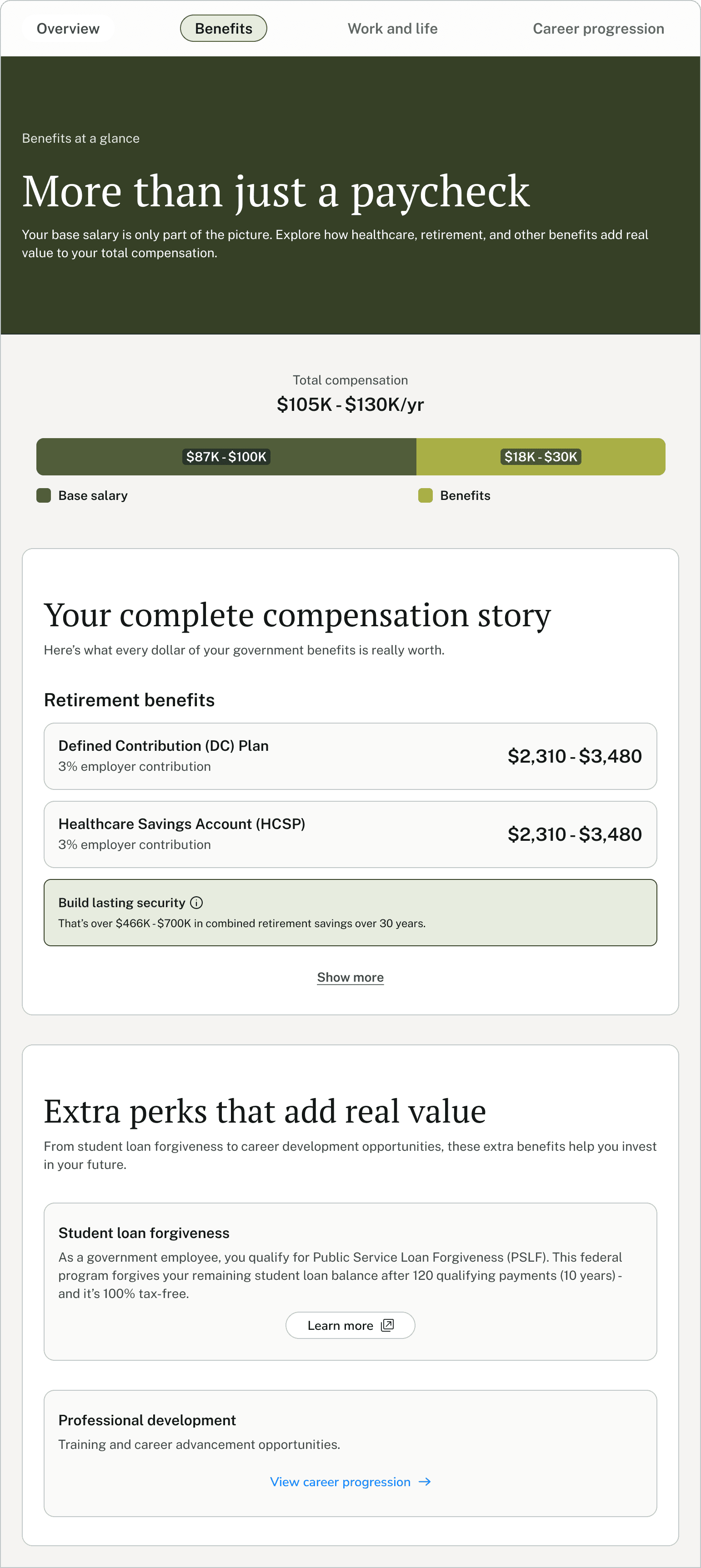
The same logic applies to compensation. Government salaries look lower than private-sector equivalents until pension, healthcare, paid leave, and PSLF eligibility are added back in, which recruiters typically explain one candidate at a time in screening calls. GovSkills surfaces the full compensation picture on the posting itself, so applicants self-qualify on accurate numbers and recruiter time shifts from explaining benefits to evaluating fit.
Pros
Layers on top of postings already maintained in the ATS, so HR teams do not write or maintain a second version of any job description
Closes the plain-language gap that makes outbound on LinkedIn Recruiter labor-intensive, so the same translated posting serves both inbound applicants and outreach campaigns
Total compensation, including pension, healthcare, paid leave, and PSLF eligibility, is calculated and displayed on every posting, replacing the benefits explanations recruiters currently handle one screening call at a time
Purpose-built for city, county, and state roles, where applicant pool thinning is most severe
Free for job seekers, which removes the registration and payment friction that other candidate platforms create at the top of the funnel
Cons
Translation works best for roles with clear private-sector, military, or nonprofit equivalents; positions unique to government (some sworn or regulatory roles) benefit less from skills mapping
Highest impact when paired with outbound tools like LinkedIn Recruiter that bring non-traditional candidates to government opportunities in the first place
4. eSkill
Role in the stack: Pre-employment skills testing and candidate assessment
Government hiring has long relied on civil service exams and structured assessments to ensure merit-based decisions. eSkill brings that function online with a library of over 600 pre-built tests covering job-specific skills, situational judgment, cognitive aptitude, and software proficiency. For government HR teams, this means being able to assess candidates objectively and document the basis for hiring decisions, both of which matter for compliance and equal opportunity requirements.
eSkill's government-specific tools include identity verification, remote proctoring for online exams, and a Team Scoring feature that allows hiring committees to review and score candidate responses collaboratively. This is particularly relevant for government hiring panels, where multiple reviewers often need to evaluate candidates independently before comparing scores.
Custom test creation is also available, letting HR teams build assessments around the specific knowledge or skills a role requires rather than relying on generic templates. For agencies recruiting for specialized technical roles, public safety positions, or administrative roles with specific software or regulatory requirements, this flexibility is more useful than off-the-shelf aptitude tests.
Pros
Over 600 pre-built assessments covering a wide range of job types relevant to local government, from administrative and finance to technical and public safety roles
Remote proctoring and identity verification allow online testing without requiring candidates to appear in person, which broadens the applicant pool
Team Scoring supports the hiring committee review process common in government without requiring separate coordination tools
Custom test creation lets agencies assess role-specific knowledge rather than only generic aptitude
Defensible, documented scoring supports merit-based hiring and helps agencies demonstrate compliance with civil service requirements
Cons
Pre-employment testing adds a step to the application process, which can increase candidate drop-off if not positioned clearly as a standard part of the process
Test design for niche or highly specialized roles requires time from HR or subject-matter experts to build well
Does not replace structured interviews or reference checks; most effective as one component of a multi-step assessment process rather than a standalone gate
5. HireRight
Role in the stack: Background screening and pre-employment verification
Background screening is a non-negotiable part of government hiring, particularly for roles that involve public trust, access to sensitive data, financial systems, or vulnerable populations. HireRight is one of the most widely used background screening platforms globally, processing over 120 million screens annually across roughly 34,000 customers. It offers criminal history checks, employment and education verification, drug testing coordination, and compliance management in one platform.
For government HR teams, HireRight's compliance infrastructure is particularly relevant. The platform manages FCRA requirements, tracks jurisdiction-specific rules on the use of criminal history (including ban-the-box laws that vary by state and locality), and maintains an audit trail that documents how screening results were used in hiring decisions. This matters because government agencies face heightened scrutiny on hiring fairness, and a poorly documented screening process creates legal and regulatory exposure.
HireRight integrates with over 70 applicant tracking systems, including NEOGOV, so screening can be initiated directly from the ATS without manual data re-entry. A mobile-friendly candidate portal allows applicants to submit consent and personal information digitally, which reduces the paperwork burden on both sides and shortens turnaround time.
Pros
Comprehensive screening covering criminal history, employment verification, education verification, drug testing, and more
Built-in FCRA compliance management and jurisdiction-specific rule tracking reduces legal risk for government agencies
Integrates with NEOGOV and 70+ other ATS platforms, keeping screening within the existing workflow
Mobile-friendly candidate portal shortens turnaround by letting candidates submit information and consent digitally
Audit trail documentation supports defensible hiring decisions, which is critical for agencies subject to civil service oversight or public records requests
Cons
Turnaround time varies by check type; employment and education verifications that depend on third-party response times can extend timelines by several days
Per-check pricing adds up at high hiring volumes; agencies with frequent high-volume recruiting cycles should negotiate enterprise rates upfront
Screening results require HR judgment to interpret; the platform flags information but does not make hiring decisions, which means training on how to use results consistently is still an HR responsibility
The stack in practice
These tools cover five distinct functions: managing the process (NEOGOV Insight), reaching passive candidates (LinkedIn Recruiter), expanding the qualified pool of candidates through translation (GovSkills), assessing candidate skills (eSkill), and verifying candidate backgrounds (HireRight). None of them duplicate what the others do.
An agency running all five has addressed the full chain from first contact to the final offer. An agency running just one or two has gaps that add time, reduce candidate quality, or create compliance exposure. The question isn't which single tool is best; it's which gaps in your current process are costing you the most time, money, and qualified candidates.